Talk to an expert! Fill in the fields below!
          

Document Management Software

Centralize and control alltechnical documents securely

Organize manuals, certificates, reports, and records in one place, with full traceability and quick access. Reduce risks, avoid outdated versions, and meet regulatory requirements with ease. 

All document management processes in a single solution 

Version control

Keep all versions of documents stored in an organized manner, with complete change history and comparisons. Ensure that all users always have access to the correct and updated version. 

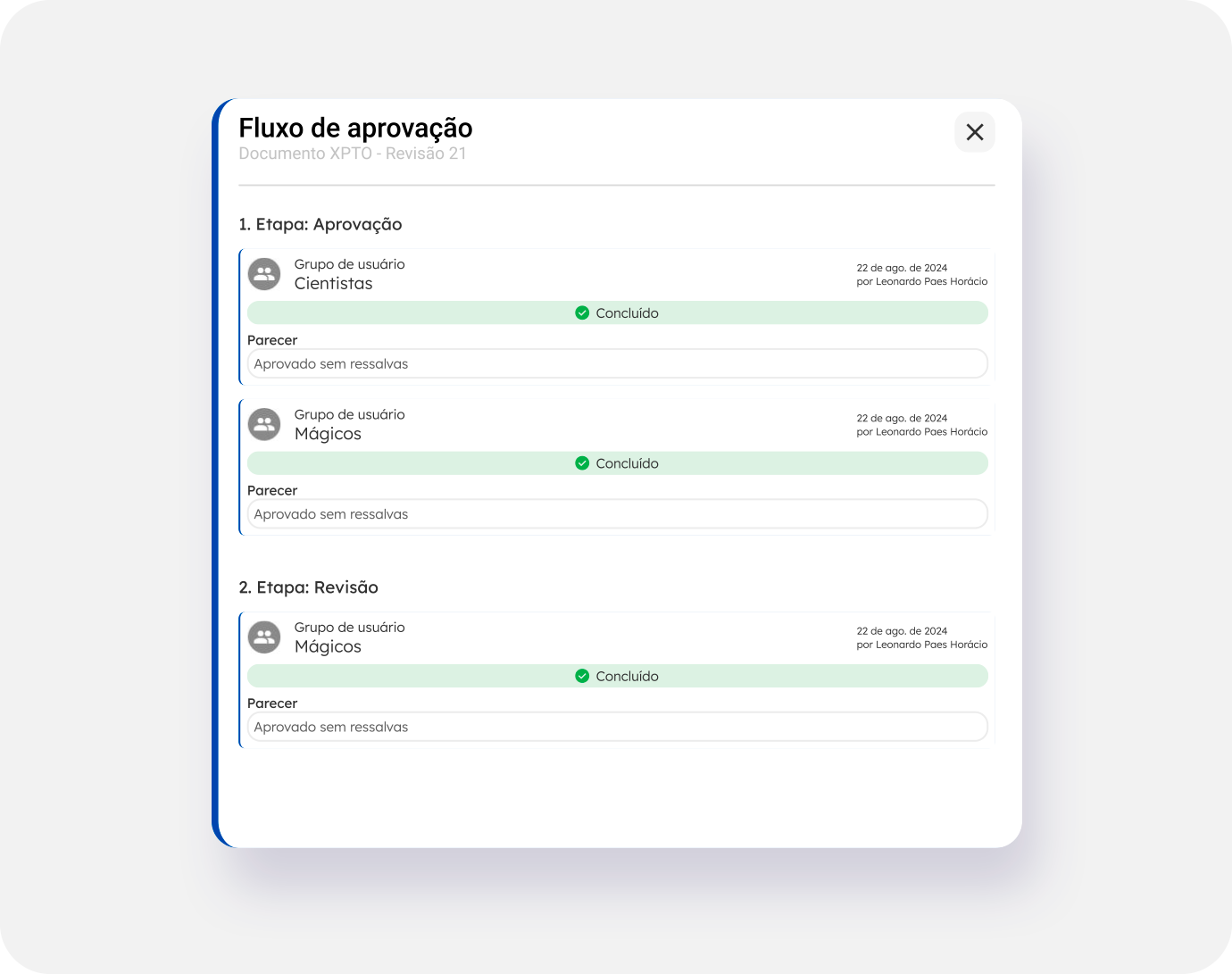
Digital approval and review

Implement automated approval workflows with electronic records of revisions, approvals, and signatures. Increase the security and traceability of critical documents, reducing risks and rework. 

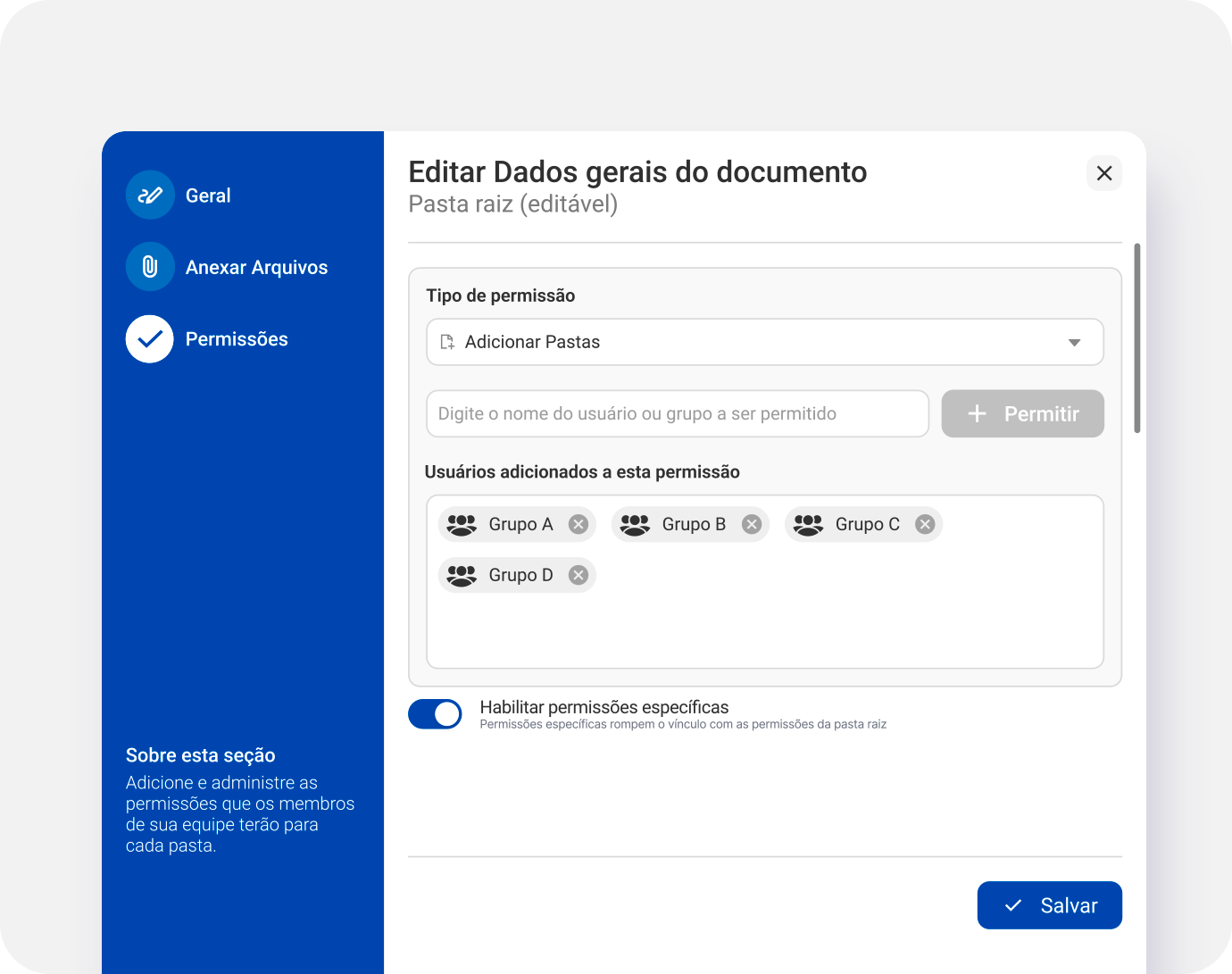
Permission and access management

Define who can view, edit, or approve each document, by area, role, or level of responsibility. Ensure confidentiality and compliance with quality and safety standards. 

All document management processes in a single solution

Version control

Keep all versions of documents stored in an organized manner, with complete change history and comparisons. Ensure that all users always have access to the correct and updated version. 

Digital approval and review

Implement automated approval workflows with electronic records of revisions, approvals, and signatures. Increase the security and traceability of critical documents, reducing risks and rework. 

Permission and access management

Define who can view, edit, or approve each document, by area, role, or level of responsibility. Ensure confidentiality and compliance with quality and safety standards. 

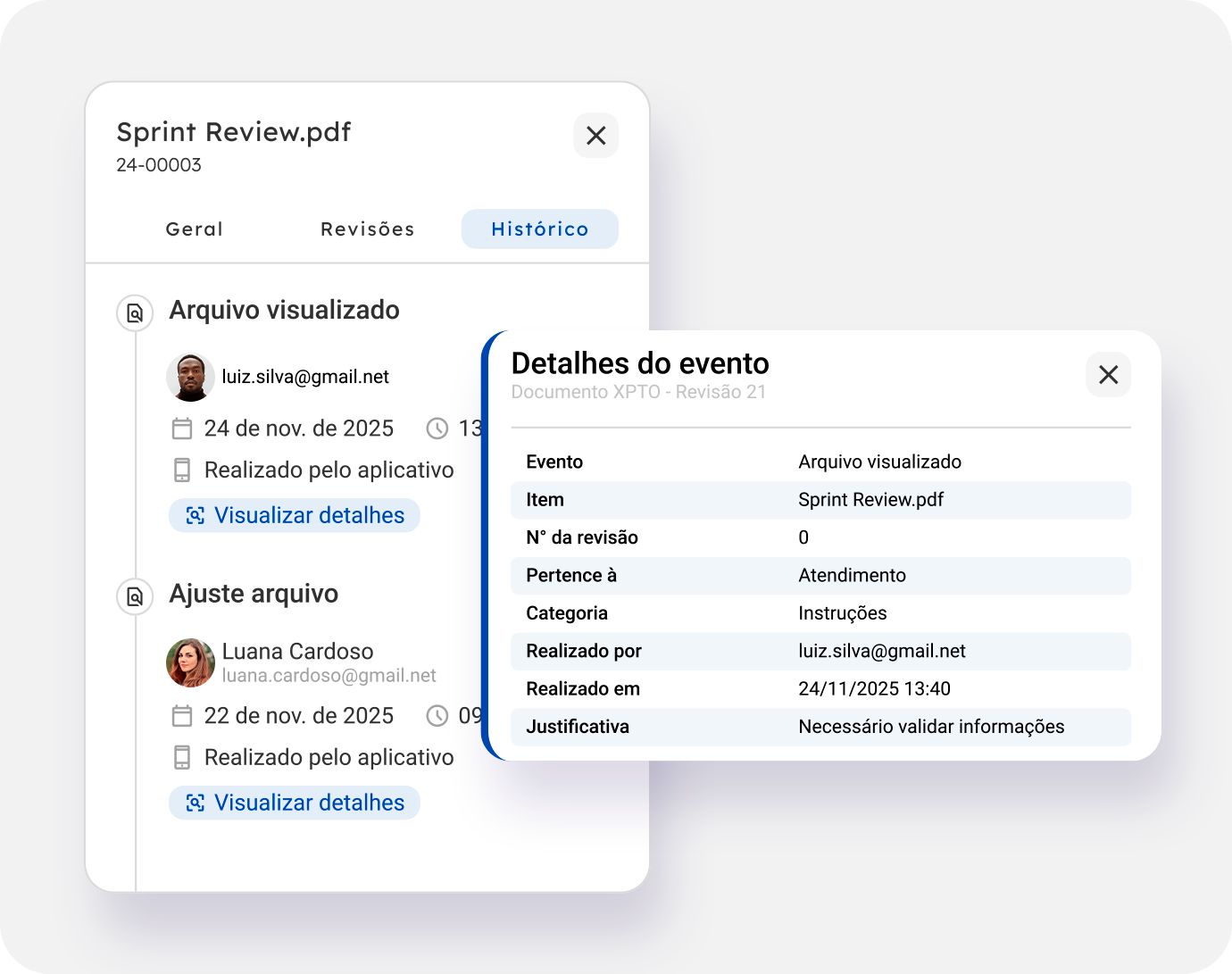
Everything recorded, everything controlled

Monitor every action, change, or document movement, ensuring a complete history and full traceability. 

Right access, at the right time

Documents available in real time, for those who need them, when they need them, quickly and without red tape.

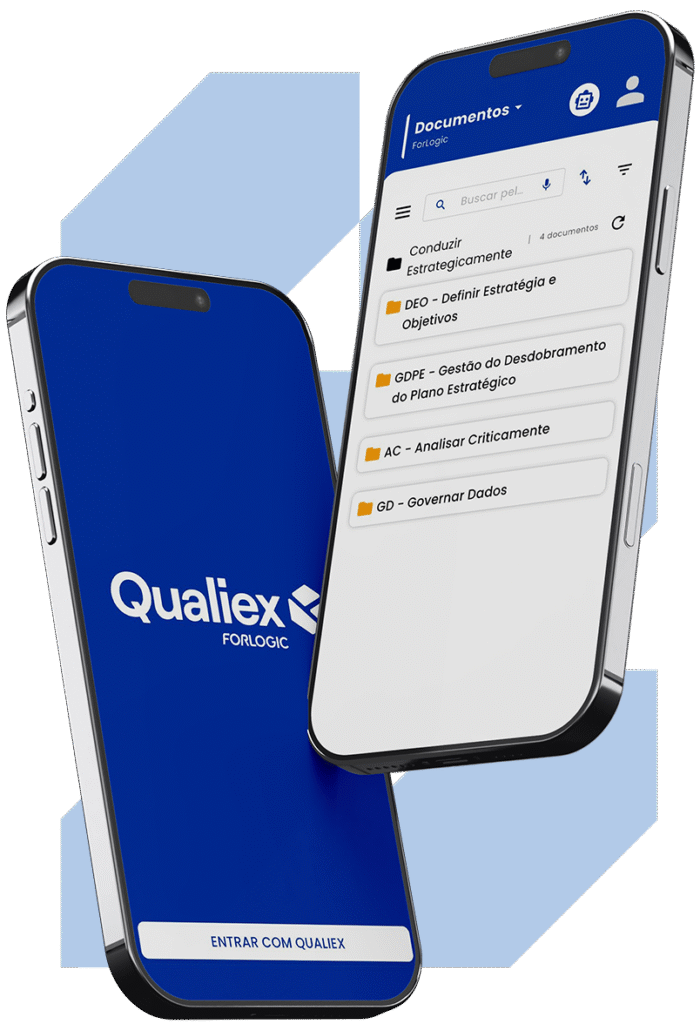
Mobile access anywhere

You have access to ForLogic's exclusive super app and can view your organization's documents anywhere!

Confidence in every file

Ensure that documents remain intact, free from unauthorized changes or corruption

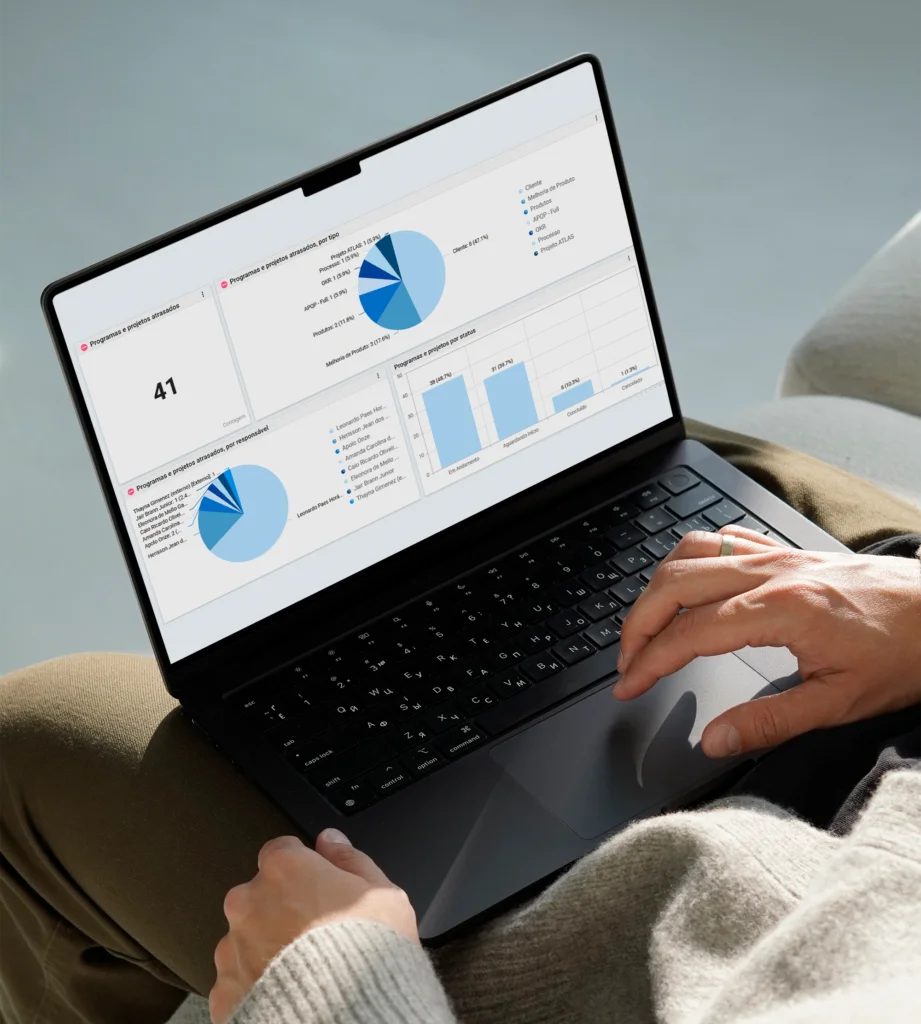
Customizable dashboards for tracking and presenting results

Qualiex integrates information from all modules, transforming scattered data into a single, strategic view. 

With intelligent dashboards in the Analytics module, you can identify patterns, behaviors, and relationships within your QMS, helping you predict failures, anticipate risks, and prioritize what really matters. 

With the Analytics module, you can see how each aspect of quality is connected, influences and shapes the company’s performance, all with the simplicity and robustness of Qualiex. 

With Qualiex, your company gains total control, reduces risks, and ensures compliance with standards, customer requirements, and regulations. Protect your reputation, preserve organizational knowledge, and avoid financial impacts. 

What Our Customers Are Saying

Qualiex is a system where you'll never feel left to fend for yourself, because you'll always have support from the professionals at ForLogic.
Débora da Silva Resins Quality Assistant

The implementation of Qualiex itself brought us a benefit by allowing us to optimize our document database and, as a result, gain control over everything.
Paulo Souza Administrator and Quality Manager at AFIP

The most important factor in choosing Qualiex was the system’s usability, which is excellent and provides everything we need for our management system.
César Ferreira Quality Coordinator at Prevent Senior

We're familiar with several tools available on the market, but we see what sets Qualiex apart, both in terms of customer service and functionality
Tatiane Silva Quality Supervisor

See firsthand how Qualiex transforms your quality management

FAQ - Frequently Asked Questions About Document Management

Document management is the set of practices used to create, organize, control, store, distribute, and maintain documents throughout their entire lifecycle. The goal is to ensure that information is up to date, accessible to the right people, and protected against loss or unauthorized alterations. Efficient document management reduces rework, increases compliance with standards and audits, and contributes to the standardization of the organization’s processes.

To control documents in accordance with ISO 9001, an organization must ensure that documented information is approved before publication, revised as necessary, properly identified, protected against unauthorized changes, and made available to the appropriate personnel. Using document management software facilitates this process by centralizing files, tracking revisions, recording approvals, and maintaining a complete history of changes made.

Although the terms are often used interchangeably, they have important differences. Electronic Document Management (EDM) focuses primarily on the storage, organization, and retrieval of digital files. Document management, on the other hand, takes a broader approach, also involving version control, approval workflows, distribution, traceability, retention, and compliance throughout the entire document lifecycle. In practice, a comprehensive document management solution typically incorporates EDM capabilities.

Electronic document management helps reduce rework, enhance information security, improve compliance with regulations and audits, streamline approvals, preserve organizational knowledge, and ensure quick access to the documents needed for operations.

The best way to avoid outdated documents is to adopt a structured document control process. This includes designating individuals responsible for reviews, establishing approval workflows, managing versions, and ensuring that only the current version is available for reference. With a document management system, employees always access the most recent version, reducing operational risks and nonconformities.

Document traceability is achieved by logging all actions performed on each document, including creation, revisions, approvals, publications, and accesses. During audits, this information makes it possible to verify who made each change, when it occurred, and which version was in effect during a given period. This increases the transparency of processes and makes it easier to demonstrate compliance with standards and regulatory requirements.

Document management software is a solution that centralizes, organizes, controls, and tracks corporate documents in a single digital environment. With it, you can manage versions, set access permissions, automate approval workflows, and ensure that employees always use the most up-to-date documents.

Qualiex maintains a complete history of the changes made to each document. Whenever a new revision is published, previous versions remain on record for reference and traceability, ensuring greater security and compliance for the management system.

Yes. Qualiex’s Document Management module helps companies manage the documented information required by ISO 9001 and other management standards. The platform facilitates the management of document revisions, approvals, distribution, access, and retention.

Yes. Qualiex allows you to create digital review and approval workflows by defining responsible parties, deadlines, and validation steps. This helps the company reduce email exchanges, avoid delays, and maintain a standardized process for document management.

The system can be used to manage procedures, work instructions, manuals, policies, forms, records, certificates, technical reports, SOPs, and various other documents related to quality management and organizational processes.

Qualiex allows you to configure specific permissions by user, position, team, or department. This ensures that each employee has access only to the documents necessary for their role, thereby enhancing security, confidentiality, and compliance with regulatory requirements.

Yes. All activities are logged in the system, including reviews, approvals, changes, and access. This ensures complete traceability of documents and facilitates internal and external audits.

Yes. The system centralizes documents in a single environment, eliminating common problems associated with spreadsheets, local servers, and shared folders—such as duplicate versions, lost files, and a lack of control over changes.